
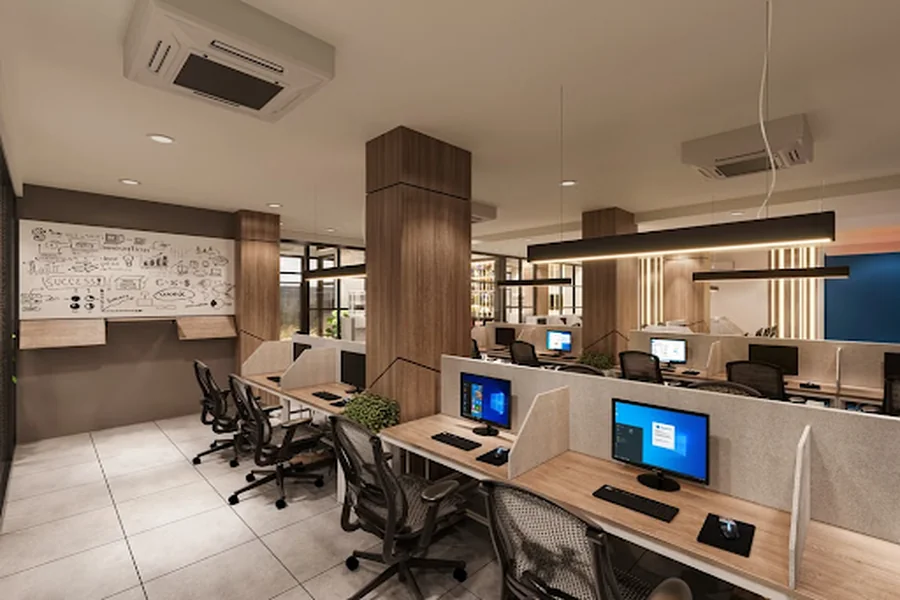
Is your office leaking secrets without anyone noticing?
Open offices are fantastic for collaboration. However, they do suffer from one huge drawback… Transparency. All those monitors, printouts, sticky notes with passwords written on them. Everyone can see it all.
Here’s the thing:
Most breaches aren’t the result of a hacker sitting in front of a computer. They’re the result of people. Humans were a factor in 60% of breaches in the latest Verizon report.
Protect the people, and you protect the data.
Walk through these easy steps for protecting private information in your open office. Learn why purchasing rectangle desk dividers is one of the best small victories you’ll ever achieve.
Let’s get into it!
Inside this guide:
- Why Shared Offices Put Your Data At Risk
- Rectangular Desk Screens: Your First Line Of Defence
- 5 Habits That Keep Confidential Information Safe
- How To Pick The Right Rectangular Desk Screens
Why Shared Offices Put Your Data At Risk
Open-plan offices and shared offices are now standard practice. They take up less room. They cost less money. They allow easier communication with coworkers.
However, they also facilitate unauthorized access to sensitive information.
Think about it:
Someone passes by a desk and sees client information on a monitor. A contractor listens in on a call discussing payroll. There is a printout resting beside someone who hot-desks from a completely separate company.
None of them feels like a “betrayal” when you do them… But they all are.
Data breaches are costly. The average cost of a data breach in the UK was recently reported to be £3.29 million. Breaches beginning with a simple moment of distraction.
Rectangular Desk Screens: Your First Line Of Defence
When it comes to visual privacy… Physical barriers still win.
Rectangular desk screens are panels that rest on, or clamp onto the edge of desks. These screens provide a basic partition between desks which means the person sitting opposite cannot see the monitor, notes or paperwork. When kitting out an entire row of desks on a budget, economical privacy screens provide every workstation with a rectangular privacy barrier which stops prying eyes without emptying the company cash box. The rectangular shape also sits flush with desks, spanning the full width of each workstation with no gap at either side.
Reasons they work so well: They obstruct the view. Easy to use – no software. No passwords. They silently work, day in and day out.
BONUS: Many rectangular desk screens are made with sound absorbing fabric. So your private conversation about that sensitive contract won’t carry across the room.
Pretty handy, right?
But here’s what most offices miss…
Screens only protect the contents of your desk. Lock down confidential info with proper screens AND habits.
5 Habits That Keep Confidential Information Safe
Good habits are free. And they make every other safety measure work harder.
Here are the five that matter most.
Lock The Screen Every Time You Stand Up
This is the simplest habit on the list. And the one most people forget.
An unlocked screen for 2 minutes while getting coffee is considered an open door. Win == Windows key + L. Mac == Control + Command + Q.
Lock them. Require all computers to automatically lock after a few minutes of inactivity. Problem solved.
Adopt A Clear Desk Policy
Paper is still a big risk.
Contracts, Invoices, HR forms… pretty much anything eventually lands on someone’s desk. With a clean desk policy in place no confidential information will be left on an empty desk. All documents are placed in a locked drawer/cabinet at the end of the day.
It sounds strict. But it takes about 30 seconds a day.
Watch What Gets Said Out Loud
Shared offices have ears.
Private calls regarding salaries, clients or legal matters should take place in a phone booth or meeting room. Not at a hot desk next to someone who works for another company. Sound-absorbing screens can help with that as well!
Control Who Comes Into The Office
All visitors should be signed in, badged and escorted to their destination. Verizon discovered 19% of breaches were caused by internal actors. The percentage leaps to 29% throughout Europe, the Middle East and Africa.
Those inside the building mean as much as those trying to enter it.
Shred, Don’t Bin
A regular bin is not a safe place for confidential paperwork.
Place a locked shredding bin or cross-cut shredder somewhere accessible. If it’s convenient, employees will use it. If it’s buried in a cupboard… they won’t.
How To Pick The Right Rectangular Desk Screens
Screens don’t all have to be the same. Select screens based on your desks, office flow and privacy needs.
Here’s what to look at:
- Height: Privacy increases with height. Privacy between 400mm-600mm above desk level works well for most office settings to eliminate the sight line of a person seated across from them.
- Width: Assuming your desk is wide enough, you want your screen to span the entire width of your desk. If it is too short you will end up with gaps you can see through.
- Material: Fabric screens will reduce sound. Acrylic/glass screens provide a sleek look with minimal noise reduction.
- Attachment type: Clamp-on screens are fast and easy to install. Freestanding screens work well on desks that cannot accommodate clamps.
Consider your personnel as well. Finance and HR handle the most sensitive information, therefore they require the most coverage. Front-facing screens eliminate the chance of people reading across your desk. Side mounted arms prevent individuals from reading over the seat next to you.
Oh, and aesthetics. Style matters. A desktop privacy filter should feel like it belongs in your office. If it sticks out like a sore thumb, people will resent it… and that makes them resent privacy-conscious culture.
It really is that simple.
Locking It All Down
Securing private data in an open office environment doesn’t have to cost a lot of money or require high-tech solutions. All it takes is a combination of physical safeguards and common sense practices.
To quickly recap:
- Fit rectangular desk screens to block line of sight and reduce noise
- Lock screens every time someone stands up
- Keep desks clear of paperwork
- Take sensitive calls somewhere private
- Control visitors and shred what’s no longer needed
None of these steps are fool-proof individually. But collectively they create many layers of security that greatly reduce the likelihood of leaks.
Begin with desks. Develop habits. Audit every few months. Your data within the office will be much safer because of it!